
Create a wedding itinerary your guests can actually use.
Share wedding-weekend events, times, locations and directions through one personalized page.
You design the page. Guests open it without downloading an app or creating an account.
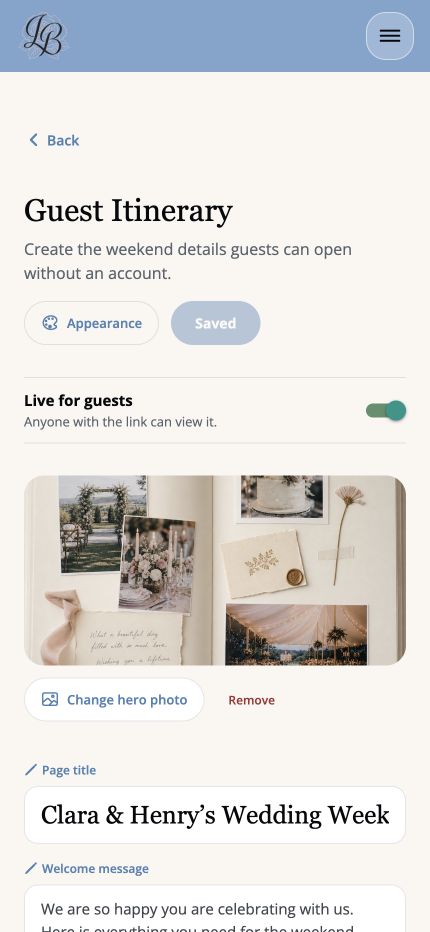
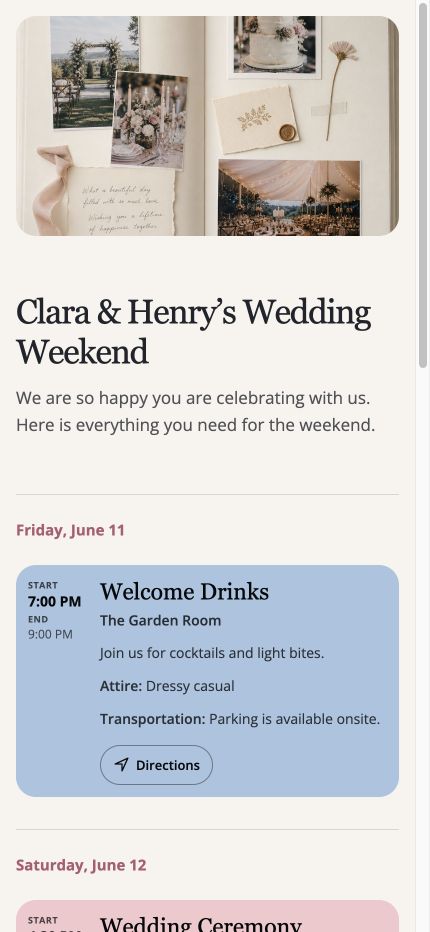
No guest login. No extra app to download.
Guests open the itinerary from your link or QR code and see the weekend information you chose to share.
Make the page feel like your wedding.
Add a hero photo
Give the itinerary a personal visual introduction.
Write your welcome
Customize the page title and message guests see first.
Choose your colors
Use your wedding colors for the page and itinerary moments.
Add weekend events
Include welcome drinks, the ceremony, reception, brunch and more.
From your wedding plan to their phone.
Build the schedule
Add the events, times, locations and notes guests need.
Personalize the page
Choose the photo, message and colors that fit your wedding.
Share it
Send the link or download the QR code for guests to scan.
Give guests the details that help.
Make it clear when each event begins and ends.
Keep the correct venue attached to each event.
Let guests open directions directly from the itinerary.
Add practical notes only where guests need them.
Share helpful context that does not belong on the invitation.
Guest itinerary questions
Do guests need an account?
No. Guests open the shared itinerary without creating an account.
Do guests need to download the app?
No. The itinerary opens as a mobile-friendly web page.
Can I customize the page?
Yes. Customize the title, message, hero photo, colors and events.
Can I share it with a QR code?
Yes. Share the direct link or download the QR code for printed materials.
Can events include directions?
Yes. Guests can open directions from an event on the itinerary.
Give guests one place for the wedding weekend.
Create, personalize and share the itinerary from your LaBelle Bridal wedding plan.