 LaBelle Bridal
A digital alternative to disposable wedding cameras.
Let guests capture candid moments on the phones already in their hands, then bring those photos together in one private wedding album.
No cameras to buy. No film to develop. No guest account required.
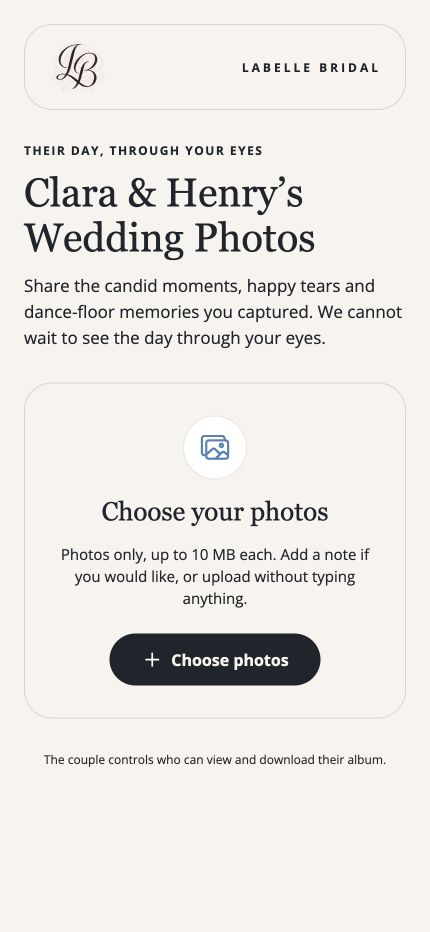
What is a digital disposable camera alternative?
It gives wedding guests one easy place to share the candid photos they take on their phones. Instead of buying physical cameras, collecting them after the reception and paying to develop film, you share a guest upload page and receive the submitted photos in one private album.
LaBelle Bridal does not imitate a film camera or limit how many pictures guests can take. It keeps the spontaneous guest perspective while removing the cost and logistics of disposable cameras.
The candid-camera feeling, with simpler logistics.
Guests still photograph the celebration from their point of view. The difference is what happens after they take the picture.
Disposable wedding cameras
- Cameras must be purchased before the wedding
- Each camera has a limited number of exposures
- Cameras need to be collected afterward
- Film must be developed before photos can be viewed
LaBelle Bridal guest photos
- Guests use the phones they already have
- No app download or guest account is required
- Guests can submit several photos at once
- Photos arrive in one private wedding album
How it works.
Set up the album before the wedding, share it where guests will see it and let them capture the celebration.
-
1
Create your guest photo page.
Add your message and choose colors that fit your wedding.
-
2
Share the link or QR code.
Add it to signs, tables, your wedding website or guest itinerary.
-
3
Guests choose their photos.
They open the page on their phone and upload the moments they want to share.
-
4
Relive the day from every angle.
The submitted photos stay together in your private LaBelle Bridal album.
Your guests notice the moments happening around them.
Your photographer captures the day beautifully. Guests capture the laughter beside them, reactions during speeches, table selfies and the energy on the dance floor.
The guest photo page gives those pictures one clear destination instead of leaving them scattered across group texts and social media.
Want a QR code for signs and tables?
See how to personalize the upload page, download the code and display it for guests.
Wedding camera app questions.
Is this a disposable camera simulator?
No. LaBelle Bridal does not imitate film or limit the number of pictures guests can take. It is a digital alternative for collecting photos taken on guests’ phones.
Do guests need to download the app?
No. Guests open the shared photo page in their phone browser and upload their pictures there.
Do guests need an account?
No guest account is required to use the wedding photo upload page.
Can we still use disposable cameras?
Yes. Some couples use both. Disposable cameras provide a nostalgic film experience, while the digital album makes it easier to collect additional phone photos.
Are the uploaded photos public?
No. Guest uploads are collected in the couple’s private LaBelle Bridal album rather than posted publicly.
Collect the candid moments your guests capture.
Give every photo one place to land without purchasing another box of cameras.
Download LaBelle Bridal